Principal UX Research • Security Systems • Interaction Strategy

VibroAuth

This project started with a question I find especially valuable in product work: what happens when the default interaction model is itself part of the security problem?

PIN entry on phones is usually treated as a solved pattern. But in public contexts, it is surprisingly easy to infer meaning from finger movement, layout familiarity, and visible feedback. I wanted to explore whether a more private interaction model could reduce that risk without making authentication feel impossibly heavy.

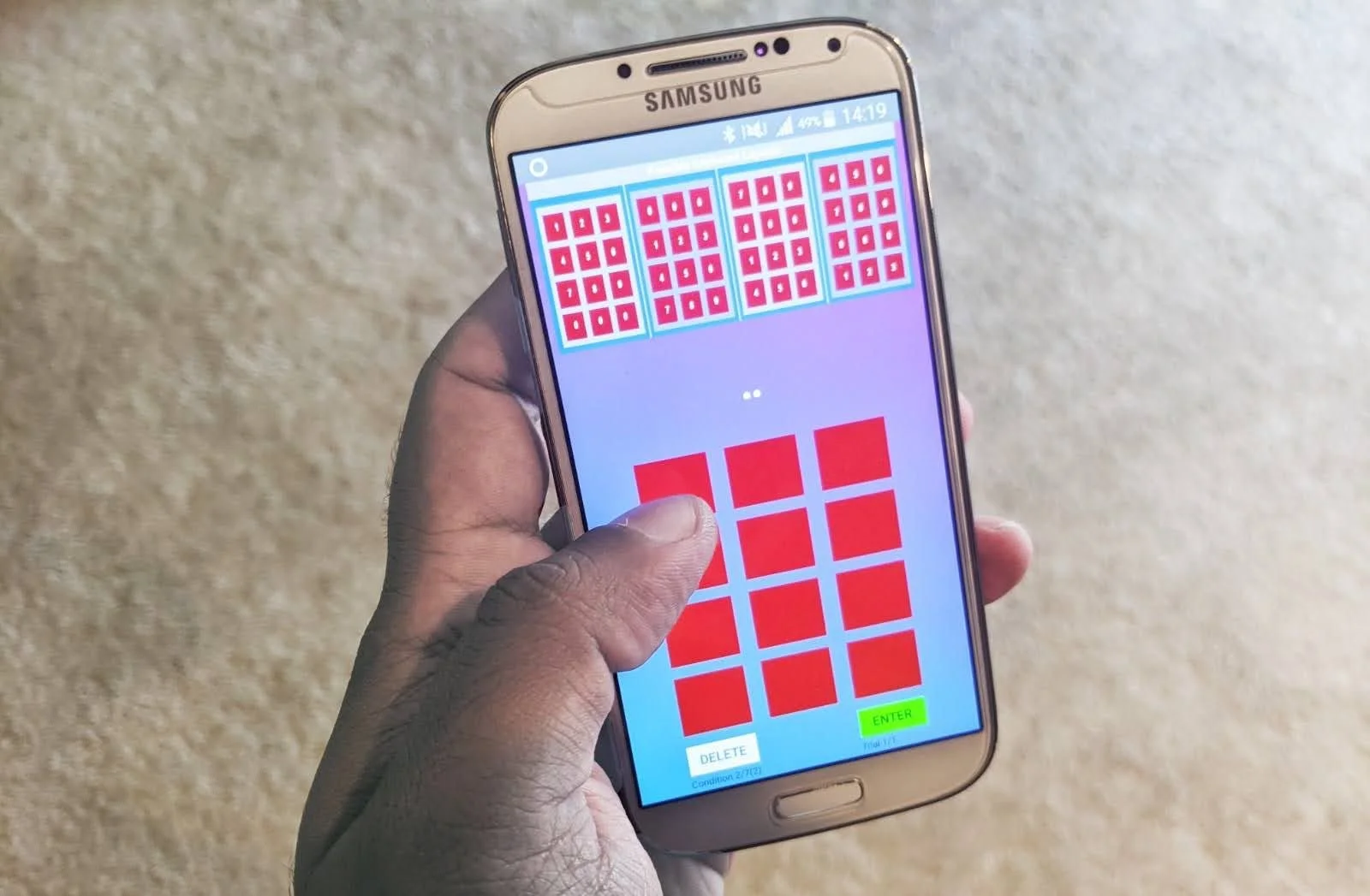
The result was VibroAuth, a non-visual, dynamically rearranged PIN entry concept that uses haptic patterns to privately communicate keypad meaning to the user while making shoulder surfing materially harder.
🔐 Shoulder-surfing resistant authentication 📳 Haptic interaction design 🧠 Learnability + cognitive load 📱 Mobile systems thinking
Problem framing Prototype design Remote study Security evaluation Quantitative analysis Product synthesis
My role
Research framing, interaction concept design, study structure, synthesis, and translating findings into product-level decisions.
Challenge
Improve privacy and attack resistance without making repeated authentication unusably slow or mentally taxing.
Outcome
A stronger model for where secure authentication concepts should live: not everywhere, but in the moments where extra protection meaningfully matters.
VibroAuth intro image
Core idea
Hide the keypad meaning, not just the input
Why this feels like principal-level work
The interesting part of this project was not only inventing a different interaction. It was identifying where that interaction creates real security value, where it introduces cost, and how it should realistically fit into a product strategy.
Recall accuracy
98.4%
Participants learned the haptic number patterns quickly, with most reaching perfect recall.
PIN accuracy
94.6%
Across the shifting methods, participants were generally able to authenticate accurately.
Security result
0 successful attacks
Touch-shifting variants reported zero successful shoulder-surfing attacks in the security study.
Critical tradeoff
Higher time cost
The most secure variants also increased time and effort, making deployment context the real design decision.

Challenge

Shoulder surfing is not only a visibility problem. It is an inference problem. Even if users move quickly, observers can often reconstruct intent from finger paths, standard keypad expectations, and visible confirmation cues. That means the default PIN flow carries a structural weakness in public settings.

Visible layouts Predictable movement patterns Public-use vulnerability

Reframing the problem

I approached this as a systems problem instead of a keypad polish problem. The question became: what if users could privately infer the layout, while observers could no longer confidently infer the meaning of visible touches? That shift opened a more meaningful solution space than simply obscuring or randomizing digits on screen.

Private cues Non-visual interaction Security through ambiguity

Key design decisions

The concept became credible because of a few deliberate decisions that balanced learnability and security rather than optimizing for one at the expense of the other.

Hide the digits completely
  • The keypad stays visible as a structure, but the numbers themselves are hidden.
  • This reduces the chance that an observer can directly map touches to digits.
Use haptics to reveal meaning privately
  • Long-touching a key plays a haptic pattern that helps the user infer the keypad layout.
  • The user receives private information without broadcasting it visually.
Constrain the layout space
  • Rows, columns, or both can shift instead of fully randomizing every digit.
  • This preserves learnability while still expanding the attacker’s search space.
Test touch-shifting as a more secure mode
  • Some variants shift again after each digit entry.
  • This increases security significantly, but also increases effort and time.
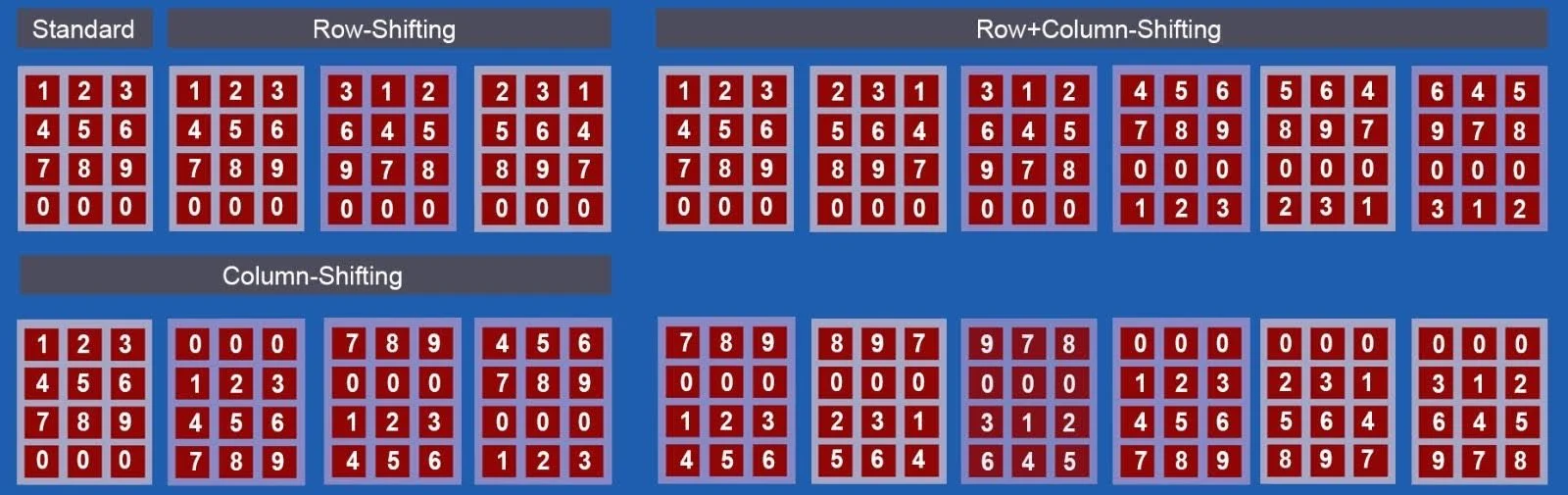
Row shift and column shift explanation
Layout logic. Rows, columns, or both can shift, creating a constrained but meaningful set of keypad states that users can infer from haptics.
Modified Morse code haptic pattern image
Pattern design. Modified Morse-style haptic patterns made the system learnable enough to test seriously instead of remaining a purely speculative concept.
Concept in motion. This demo shows the hidden keypad, haptic discovery, and the interaction sequence users follow to infer and enter a PIN.

Study design

I wanted the research to answer a product decision, not just validate a UI. The core question was: is this secure enough to matter, usable enough to learn, and practical enough to deploy in the right contexts?

Study 1: learnability and usability
  • Participants first learned modified Morse-inspired haptic patterns for digits 0–9.
  • They then used multiple authentication conditions across row-shifting, column-shifting, row+column shifting, and touch-shifting variants.
  • Measures included recall accuracy, PIN entry accuracy, time, workload, and perceived security.
Study 2: attack resilience
  • A separate group observed authentication sessions and attempted to guess entered PINs.
  • This tested whether the concept materially changed the attacker’s problem instead of only improving perceived privacy.
Study design table with shift and touch conditions
Condition design. The evaluation compares different keypad shifting strategies and touch-shifting behavior to understand how security, effort, and usability change across conditions.
Prototype learning and evaluation environment
Prototype environment. The flow was designed to move users from learning, to practice, to actual timed authentication tasks, so the concept could be evaluated as a real interaction model rather than a one-off demo.
Pattern learning flow
Learning flow. Participants first learned the haptic patterns before attempting the full authentication task, which was critical to understanding whether the system could realistically be adopted.
Practice screen
Practice stage. Before formal evaluation, participants had space to understand the mechanics and build enough confidence to use the interaction intentionally.
PIN entry evaluation screen
Evaluation stage. The actual task required users to enter PINs under different conditions, making time, effort, and accuracy measurable.
Questionnaire response
Qualitative layer. Questionnaire responses helped reveal the workload and perceived security tradeoffs behind the quantitative findings.
What I like about this setup: it does not assume that novelty equals value. It tests whether people can learn the method, use it accurately, and whether the extra complexity earns its place.

Impact

The findings pointed to a clear and nuanced product story: VibroAuth is not a universal replacement for standard unlock, but it is a strong candidate for contexts where the security gain justifies additional interaction cost.

What the studies validated
  • Participants learned the haptic patterns with 98.4% recall accuracy.
  • Overall PIN entry accuracy was 94.6% across methods.
  • Participants generally perceived the more dynamic methods as more secure.
  • Touch-shifting variants reported zero successful attacks in the security study.
What the studies exposed
  • The most secure methods also increased entry time, often to 10 seconds or more.
  • Mental demand and effort rose as the layout became more dynamic.
  • The concept is strongest in high-risk or high-sensitivity scenarios, not necessarily for every everyday unlock.
Main study quantitative results
Main results. Accuracy remained strong, but the data also made the cost of increased security visible through time and workload.
Mean number of long and short touch interactions
Interaction cost. Long-touch and short-touch behavior shows why the method is strong for protection but costly for high-frequency use.
Security study results and attack scenarios
Security study. This figure shows PIN entry under different shifting methods, the entered PIN reveal, and the successful attack rates that made the security benefit concrete rather than hypothetical.
Additional result figure
Supporting evidence. The broader result pattern reinforces the same product conclusion: stronger protection is achievable, but it should be used intentionally where the tradeoff is justified.
Additional security or result figure
Deeper read on outcomes. The concept holds up best when judged as a selective secure mode rather than as a universal replacement for standard unlock.
The most important takeaway: the right product outcome was not “replace standard mobile unlock everywhere.” It was identifying a better role for this interaction model, such as optional secure mode, high-sensitivity app access, or contexts where shoulder-surfing risk is elevated.

Reflection

This project is a strong representation of how I like to work as a designer and researcher. I am most useful when the problem is still underspecified, the constraints cut across multiple domains, and the team needs research that can shape a product decision rather than simply describe user pain.

What I’d take forward
  • Design secure modes as context-aware options, not one-size-fits-all defaults.
  • Allow users to calibrate haptic timing and intensity to fit device hardware and personal sensitivity.
  • Explore more accessible variants for low-vision and blind users without relying on visible layout references.
Why it belongs in my portfolio
  • It shows strategic problem framing, not just UI execution.
  • It demonstrates systems thinking across interaction, security, and user cognition.
  • It produces a nuanced product recommendation grounded in evidence.
Want to dig into the full paper?
Previous
Previous

New Portfolio Item